
CRM
CUSTOMER
RELATIONS
MANAGEMENT
Software that helps businesses organize and track their interactions with clients and leads, keeping contact information, communication history, and follow-up tasks organized in one place.
I had half an hour before my next gig, just enough time for this wedding interview with a prospective couple. The bride and groom had already checked I was available for their wedding date through the CRM-built form on my website. They had also used the scheduler my CRM software sent them to find this small sliver in my day when I was free to chat. I pressed call. During our 10 minute chat, I made them laugh with warnings to wear waterproof mascara, confirmed that I could play their favorite song, and, with three clicks on my CRM phone app, sent them the link to the wedding music package. They signed the contract and paid the deposit in that same form. One wedding on the calendar for next year.
Hanging up, I still had 10 minutes left so I checked my email. There sat a message from Harp Column. “Anna, could you explain how a harpist uses CRM software?” I started to laugh. Oh my, could I!
The ABCS of CRMS
Artistic professionals—from harpists to photographers—share their thoughts about CRMs.
And how do you pronounce it?
What is this magic software with the vowel-less acronym? Once invented for large-scale business sales, Customer Relations Management software, or a CRM as it’s commonly known, is now available to individuals and small-scale entrepreneurs. A CRM organizes and streamlines your interactions with customers—it collates your contacts, communications, invoices, and payments. It shows you who’s paying you, why they’re paying you, if they’ve paid, and what they said.
If you find yourself searching your inbox for emails from clients, typing the same responses to people over and over, or trying to remember if you’ve been paid for that gig you played last week, you might look into a CRM. It can free up the mental space for freelancers who would rather think about music than logistics.
My discovery
Two years ago, I had no idea what a CRM was. I was packing up after a wedding show and chatting with one of my favorite photographers. He was perplexed why I didn’t book more weddings when he and his wife had every weekend packed. “What are your email follow-up strategies?” he asked.
I looked at him blankly. “Follow-up emails?” “In your CRM!” Nearly exploding, he explained how their CRM software would organize emails they had collected at the show. Over the next several weeks, the software would send a series of follow-ups and that’s when most people would book. “You need this! You should be busier than you are.”
Chastened and inspired, I went home to research CRMs. Options abounded. I got overwhelmed. Two weeks later, I was chatting with another harpist who mentioned a CRM. She described what her whole booking process looked like from the bride or groom’s point of view. It was filled with easy-to-select menus and clean contact forms. Compared to the messy emailing and photocopied contracts I used, hers glowed. I decided I just needed to stop researching and just start. So I opened a free account with the CRM she recommended, Dubsado.
Suddenly, everything I ever wanted to know about my wedding clients was in one place! Within weeks, I found this software was so beautiful, clean, and useful that I dropped $400 for the full version. Last year, it made collecting payments so easy, I renewed it. This year, I used its lead captures and conversation scheduler at that same wedding show where my friend told me about CRMs two years ago. I doubled the number of clients I booked from that show!
From the harpist’s and bride’s POV
Let me give you a tour—here’s how I book weddings through the CRM Dubsado.
Inside, the software resembles an email program with folders and forms, easy to navigate and search. (See Ex. 1)
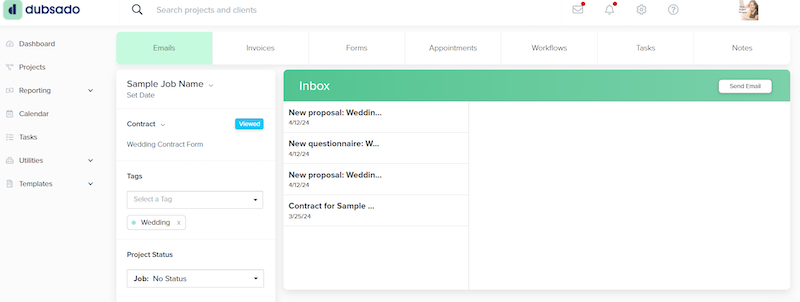
From this dashboard, I can make forms and answer emails. Dubsado does all the design and software coding so I work with an easy visual drag and drop screen to make it look pretty, then copy and paste the finished link into my socials or website.
Potential wedding clients find me online, from social media, or in person and follow a link or QR code to an aesthetic lead capture form. They enter the event date, location, and their taste in music to give me a head start on matching their vibe. (See Ex. 2)
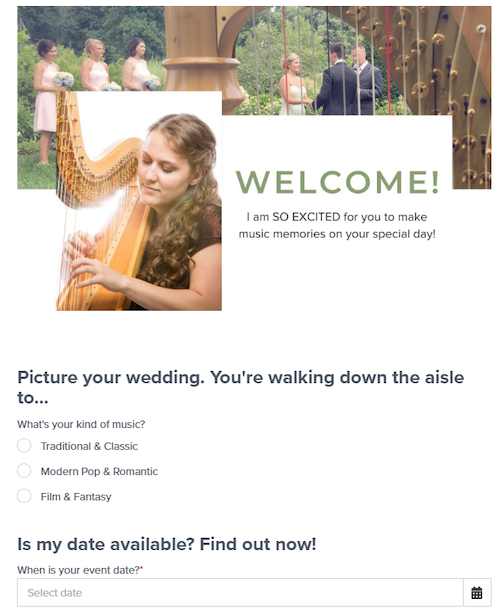
As soon as they hit send, Dubsado does three things: it sends me an alert, it creates a “project” or file to keep everything about that event in one place, and it starts an email follow-up series to keep the potential client engaged. Dubsado calls these “workflows.” When I get the alert, I double check my calendar to make sure I’m available for their date. With a few taps, I load a template email and send them a “Yes, I’m available!” Because I don’t like to book any event without talking to actual humans, the software sends them my prices and packages in a pretty form and a scheduler link that invites them to a free ten-minute conversation with the harpist.
If they don’t make any more contact the workflow keeps sending email reminders and pieces of helpful information like what a wedding is like with a live harpist or the best reviews from my past clients. Ninety percent of contacts book that first call.
After the couple and I decide together what service works best for their wedding, they click select in the package page. The software automatically adds the contract and generates an invoice in the project. They just see a beautiful link that lets them sign and pay on the same screen.
Once there is a contract, I manually trigger the software to schedule a longer consultation in person or on virtual video call where we pick songs and go over logistics. The scheduler links to my Google calendar and automatically avoids my other engagements. Yay for no more five email exchanges to find free evenings!
Dubsado has elegant forms for wedding details that both the couple and I can fill out. In the weeks before the wedding, the workflow for contracted weddings sends emails confirming details like times, song choices, and other vendor contact information. It will send a tactful reminder for an unpaid invoice. All the forms are accessible to the couple through a specialized customer portal so they can check the status of all their interactions with me.
Any emails we exchange are located in their project and include all my subtle branding in the formatting. Since I can access the app on my computer, phone, or iPad, I can check the contract, confirmation, emails, and invoices anytime—even at the wedding! From start to finish, the couple sees my elegant graphics, and I have all the details I need in one place.
CRMs for harp teachers
The biggest thing that MMS has done for me is allow me to speed up the ‘business’ side of my studio while also making my record-keeping easy and rewarding.
—Jill Gossling Weaver
What if instead of busy brides you’re working with busy students and parents? Your 2:30 p.m. lesson just canceled and they want to reschedule for tomorrow. Have they paid this month? And didn’t someone else just book Thursday? Find all your answers in one place with your CRM.
Harpists teach because they love music, not because they want to spend hours coordinating calendars with their students. Fortunately there are CRMs specifically designed to make studios simpler. I reached out to full-time harp teacher Jill Gossling Weaver, who gave me the download on how she uses the CRM MyMusicStaff in her Rigby, Idaho, studio.
“MyMusicStaff is probably the highest value service I pay for on a monthly basis,” she says. “I manage a studio of between 50–70 students at any given time, and MMS is the only way that I’ve been able to manage a studio of that size.
“MMS allows me to collect student information directly from my sign-up page on my website or manually on the teacher side. I am able to manage my schedule through a calendar that syncs directly with my Google Calendar. I can set up a repeating lesson schedule or handle it week to week. I can even set up ’empty’ slots that students can view and sign up for … I am able to auto-send invoices each month … Students can pay through the website. If they pay another way, I can still record the payment in the software.
“The biggest thing that MMS has done for me is allow me to speed up the ‘business’ side of my studio while also making my record-keeping easy and rewarding. It has also taken away the mental load of tracking down payments from students. I can easily see who has paid me. If someone has forgotten to pay, I can simply schedule a reminder email to be sent to the student.
“I love teaching, and I have the privilege of doing it full-time, but I am only able to do that because I have a reliable CRM. MMS is by far my favorite, but I do know there are others out there that are also quite good. At less than what I charge for one lesson, it has been more than worth the cost!”
Which one should I choose?
CRMs range from general use to industry specific and from free to thousands of dollars a year. There are well known ones like HubSpot, a generic option that works for lots of business models. There are brands for event professionals like photographers or wedding musicians, such as Dubsado and HoneyBook, which emphasize single events and customer experience and aesthetics. CRMs for music teachers cover the same three needs—contacts, communication, and accounting—while adding a lot more scheduling features. You can use CRMs like Honeybook for coaching, but models like MyMusicStaff, TutorBase, and Kyrios are designed for teachers with regular lessons who want to spend less time correcting calendars and more time with kids and music.
While CRMs put a lot of your functions in one place, they don’t actually provide payment services, email, or calendars. They link to your existing services. You will still need a separate payment processing platform like Square or Stripe to take credit cards and an email provider like Gmail or Outlook.
DIY a CRM
“Wait!” you say, “This sounds expensive! Do I really need a CRM?” Well, no. Like a stick-twirling circus ringmaster, CRMs are a tool to keep your three big needs in one tent: contacts, communication, and accounting. But it is possible to do everything you do in a CRM using separate services. Everything I do in a CRM you could do by mixing and matching other online tools—many of which are free.
Contacts: For contacts, social media like Facebook and Instagram provide basic ways of tracking potential customers. A lead capture plugin on a WordPress or Squarespace website can send you all the same information as a CRM lead capture.
Communication: If you don’t already have a business email, you can get one for free or at a very low cost. Basic Gmail is free, but you can also pay for Google workspace, which also includes other useful services.
Most email software like Gmail or Thunderbird can save contacts, create email templates, and schedule emails for a future send date. Alternatively, you could keep a document file of your most often sent emails to copy and paste when needed.
Scheduling: Clients can book time with you using a free service like Calendly or Google and pick from times you set in advance.
Contracts/Forms: You can create your own price sheets and fill out forms and contracts in free softwares like Google Docs or Canva. I like to have my prices listed in a professional-looking pdf for easy advertising outside my CRM. I keep both PDFs and JPEGs of my price sheets and repertoire lists on my iPhone to easily share with a potential client in front of me.
If you want to have students or customers digitally sign contracts, you can grab something like OpenSign, Docusign, or basic Adobe.
Accounting and Invoicing: If you already have accounting software like QuickBooks or Quicken, you can create invoices there. Payment systems like Venmo, PayPal, or Square also can create invoices and take credit card payments at the same time. Yay money.
Organization: The advantage most people mention about CRMs is having everything in the same place. But you can do that manually. Set up a subfolder on your computer, then save everything about your customer, the event info or lesson plan, invoices, and emails in one place.
And there you have DIYed your own CRM, mostly for free. This is basically what I did before Dubsado. But what you save in money, you have to account for in the cost of your time. You have to write emails and forms from scratch. You have to put the time into schedules, calendars, and organization. Plus remember a dozen passwords!
Deciding what’s right for you
Take a quick inventory of your gigs and how you get customers. Do people find you by word of mouth or online? Do you want more people to find you online or an easy way to keep track of people you met at a show? CRMs are especially good at online connections.
Would this make your customer’s life easier? When I started playing weddings, most people preferred in-person meetings, paper contracts and checks. Now most of my couples would rather interact entirely online and pay via credit card. Online has become normal, and CRMs make booking and paying easy for your computer generation customers. The golden principle of selling is make it easy for people to give you their money!
Then ask, would this make your life easier? Ever since I started playing weddings, my biggest fear is that I will forget something, miss an incoming inquiry, lose a song list, or straight up forget a date.
My CRM helps my gig-related anxiety. My favorite thing is that it sends me alerts when people reach out and keeps all of the information I need where it’s easy and accessible on my phone, my iPad, my computer. It helps me overcome my paranoia and be a joyful part of these special events. I can’t put a price on peace of mind.
Beginning is the hardest part
Like most things that make your life easier in the long run, your CRM needs a lot of time at the beginning. The refrain I hear from users is “There are so many features inside the software I’ve never even touched!”
I wouldn’t say learning to use a CRM is hard—tutorials abound. But it took me several days when I started to get set up. Even with beautiful pre-made templates, it took time to reformat Dubsado’s forms from photographer to harpist. It took time to tweak email template responses and campaigns/workflows. I’m still discovering features two years later. The week before I wrote this article, I finally figured out how to customize the web address so that all of the form links look like they came from me and not from Dubsado.
But that time invested at the beginning has paid off in current convenience. Now instead of having to sit down and write out a response to every single inquiry, I send a pre-written response in three clicks. Instead of having to type everyone’s name and contact over and over again, the software fills name and date fields automatically, saving me lots of typos.
What a CRM can’t replace
These are amazing tools, but a CRM can’t do everything. It manages customer interactions, but it can’t actually relate to the customer. It creates easy email templates, but not the sales psychology to write effective messages. And it can’t substitute your personality, musicality, or professionalism.
Real talk? No matter how cool your tools, people don’t hire you based on your digital gadgets. They book you because they like you, as a performer, as a musician, as a teacher. They book because they connect with you as a person. If a harpist who wanted to start gigging or teaching asked me for advice on how to get started, getting a CRM would not even make my top ten recommendations. Tools come and go, but your commitment to connecting with clients, inspiring students, and sharing music is what crosses platforms and endures updates. Online or in person, your professionalism is your motivation. Add CRMs into your repertoire and choose one that lets your personality shine. •
The ABCS of CRMS
Artistic professionals—from harpists to photographers—share their thoughts about CRMs.
“I use Dubsado to keep my business organized by managing client inquiries, contracts, invoices, and workflows all in one place. It helps me save time through automation so I can deliver a smoother client experience while focusing more on growing my business.”
—Adrienne Knauer
professional harpist and DJ
Phoenix, Arizona

“I use Dubsado for my wedding CRM … I looked into Dubsado, Honeybook, and Hubspot originally, and Dubsado had the most customizability. … I love that I can customize the forms, add custom fields … It creates a really beautiful and streamlined process for my clients, and I get a lot of comments on how impressed they are by it!”
—Toni Cherub
professional harpist
Charlottesville, North Carolina
“I value how a CRM like HoneyBook creates a centralized, professional system. … I chose HoneyBook specifically for its affordability, intuitive design, strong integrations, and reporting tools that elevate the client experience.”
—Nichole Rohrbach-McKenzie
professional harpist
Cazenovia, New York

“For many of my [business consulting] clients, a CRM is a bit overkill for their needs, especially if they’re just getting started. I usually recommend getting a custom email and Google Workspace; it’s a familiar interface and they’ve added both contract and booking calendar functionality, which eliminates two of the big reasons why people set up a CRM.”
—Hannah Warren
harpist and business consultant
Chelsea, Quebec

“I use a CRM for two reasons: First, it creates a polished and professional experience for clients. Second, it allows me to keep everything (leads, contracts, invoices, payments, notes, meetings, etc.) in one place so that I can stay organized.”
—Christina Thomas
professional harpist
Richmond, Virginia
“[Using a CRM] has been a game changer! It keeps all the details for each of my weddings and events organized and easy to find; no more juggling a million details in a bunch of different places.”
—Maia Wachter
professional harpist
Fort Wayne, Indiana

“We chose our CRM because it felt built around relationship-based businesses instead of just sales funnels. We wanted something that helped us stay human, organized, and present with our clients while still handling the backend logistics efficiently.”
—Wes and Chelsea Jerdon
wedding photographers, Westley Leon Studio
Greater South Bend, Indiana